
Rules and dayparting are written for normal days, so they misfire on sale days. Here's what changes when AI works toward a goal inside your guardrails.
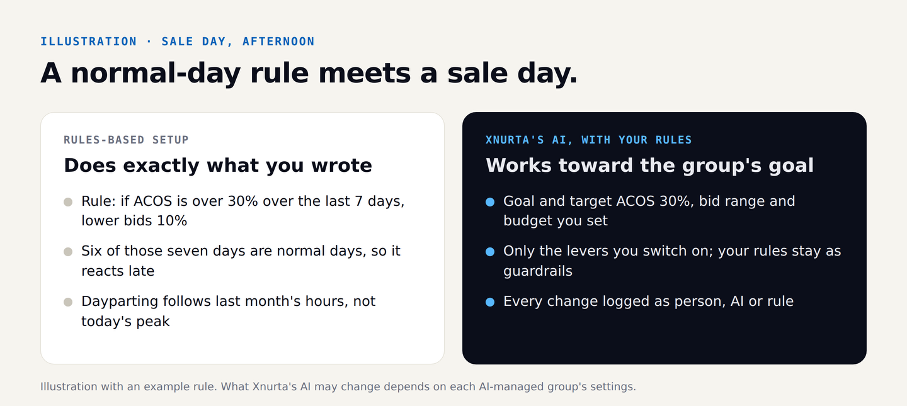
On a sale-day afternoon, a 7-day ACOS rule keeps trimming bids on a winner, because six of its seven days were normal days. Rules like this are predictable, easy to audit and fine on a normal day. On a sale day they work from normal-day thresholds and schedules, while clicks cost more and orders arrive late. With Xnurta, you set your key rules up as guardrails, its AI works toward each group's goal inside them, and with Xnurta MCP you steer it all from chat. You can pilot it on one client while the rest stay where they are.
Rules-based Amazon Ads tools do one thing predictably: they act when a number crosses a line you drew. A typical rule reads “if ACOS is above [30]% over the last [7] days, lower the bid [10]%”. A dayparting schedule raises bids in the hours your products usually sell and lowers them overnight. You know exactly what will happen, you can audit it, and on a steady account that is often enough.
Rules and schedules break on a sale day because they're written for normal days. Clicks usually cost more, orders arrive hours after the click, and the busiest hours shift. A rule looking at today's unsettled hours, or a schedule built on last month's hours, can act at exactly the wrong time.
None of this means rules are wrong. It means someone has to watch them closely on the days that matter most, usually across every client at once.
Xnurta's AI works toward a goal instead of reacting to a threshold. You group related campaigns, for example every campaign for one product line, and give the group a goal, a target ACOS, a bid range and a budget. The AI adjusts inside those limits, using only the levers you switch on: (1) placement, (2) dayparting, (3) performance-based bid adjustments, (4) budget dynamics, (5) negative targeting, (6) target harvesting and (7) structure optimization.
AI-managed groups cover Sponsored Products, Sponsored Brands and Sponsored Display. Dayparting becomes one lever among seven, adjusted toward the goal, rather than a fixed schedule. The optimization runs in the Xnurta platform, and every change is logged as a person, Xnurta's AI or a rule.
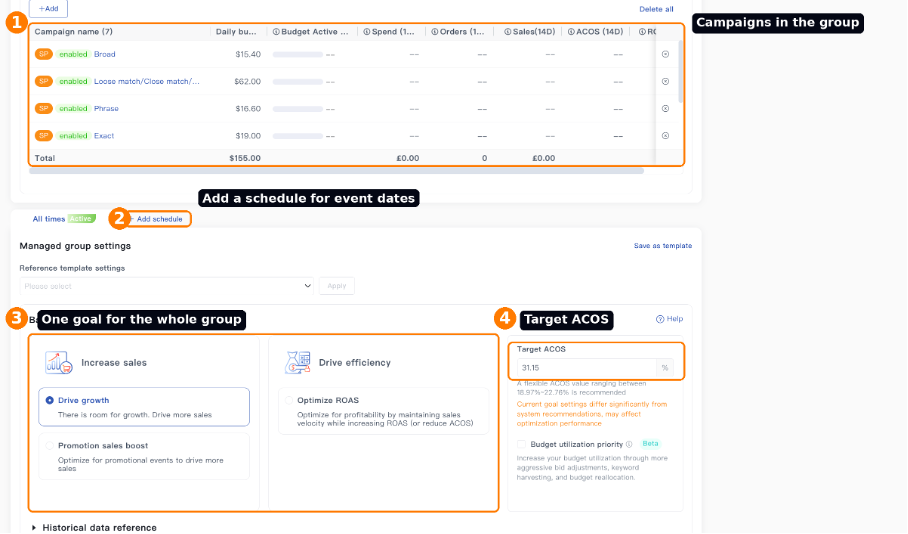
On a sale day, the difference is what happens between check-ins. A rules-based setup does exactly what you wrote until someone changes it. With Xnurta, the AI keeps adjusting inside each group's limits, and your next check-in starts from a log of what it did and why. Early morning: what isn't live; afternoon: pace against the ACOS goal; evening: pull each client's log. You can switch AI off for a group or a whole client at any time (see below).
The full three-check-in playbook, with free skills you can run tonight, is in our Prime Big Deal Days 2026 playbook post.
No. You set the rules you trust most up as guardrails in Xnurta, and the AI adjusts inside them. Typical guardrails are a maximum bid, a daily spend ceiling and brand terms that are never cut. You can switch AI off for a group or a whole client at any time.
Two kinds of change, kept separate:
On the day: pause AI for a whole client in one step. Switching AI off leaves bids where they are, and the log shows every old value if you want to set one back.
Xnurta MCP connects your AI assistant, such as Claude or ChatGPT, to Xnurta, so you manage all of this in plain words. MCP stands for Model Context Protocol, an open standard Anthropic introduced in 2024. Instead of opening each client's rules screen, you ask one question across your accounts and adjust goals, budgets, rules and the base and maximum the AI stays within, for a whole group at once.
Try this prompt: Across all my client accounts, which AI-managed groups are behind on budget pace and above their target ACOS this afternoon? List them by client with pace, ACOS against goal and sales against plan.
The answer comes back as a list by client and group, read from today's hours. Then one more request adjusts a group for the event:
Try this prompt: For Prime Big Deal Days, set our [Kitchen] group to Promotion sales boost with a $[800] daily budget on October 6–7, keep bids between a base of $[0.80] and a maximum of $[2.50], keep our rule that brand terms are never cut, then switch back to the current settings. Show me the before and after first.
For an agency, one Xnurta MCP connection can cover all or selected client ad accounts, or you can limit each token to one client. Permissions are ticked one by one, and a connection never goes beyond its creator's own Xnurta permissions.
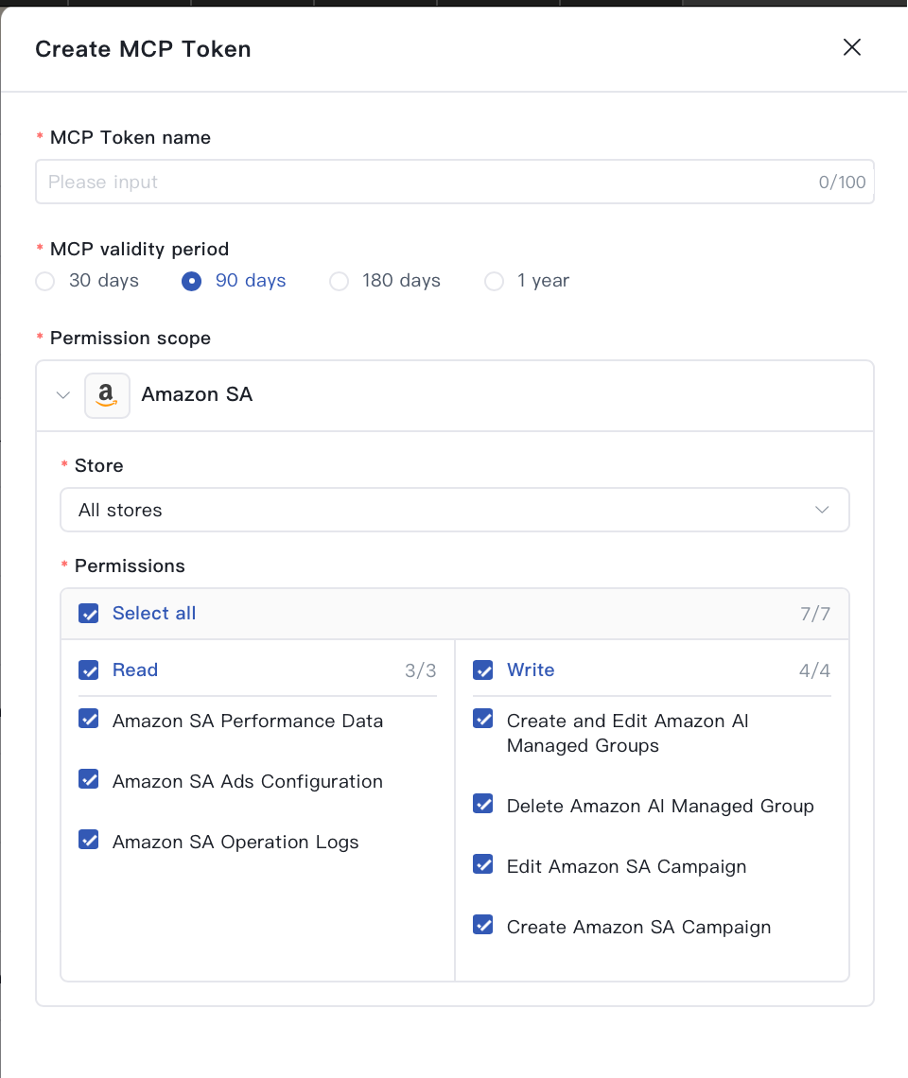
For a second approval layer, Claude Team and Enterprise Owners can set each connector tool to Always allow, Needs approval or Blocked, and ChatGPT admins can choose settings such as “Always ask”. Use your agency's approved business AI plan: Anthropic and OpenAI don't train on those by default.
Start with one client, not thirty. Connect that client's ad account in Xnurta, set its key rules up as guardrails, and switch off three things for those campaigns in your current tool, so two tools don't adjust the same bids: bid rules, budget rules and dayparting schedules. The rest of your accounts stay where they are. After the event, compare the pilot client's results and log with your other accounts.
Rules are enough for a steady account with few campaigns and no big events. AI has trade-offs too. It works toward the goal you give it, so a goal, bid range or budget set too wide lets it spend more than you meant; a new group has less of your account's history to work from; and you trade a rule you wrote for a log you read. Set the limits first, start with one group, and read the log after each check-in.
Book this week if you want Xnurta running before Black Friday (November 27). The demo runs on a demo account: we set up one AI-managed group with an event goal and your rules as guardrails, adjust it from chat, show what the AI changed and why, and pull the client-ready log. Xnurta MCP is for Xnurta customers; customers create their connection in the Xnurta platform and can start with a read-only token.
Before Black Friday: See one AI-managed group with your event goal and your rules as guardrails, adjusted from chat, and the client-ready change log. On a demo account. Book a demo →
Rules act when a metric crosses a threshold you wrote, over a lookback window you chose, such as lowering bids 10% when ACOS passes 30% over 7 days. Xnurta's AI works toward a goal you set for a group of campaigns, inside the bid range, budget and levers you allow, and you can keep rules as guardrails around it.
No. Rules can stay as guardrails, and dayparting is one of seven levers Xnurta's AI can use when you switch it on for a group. The change is who decides the next move inside those limits: a fixed rule, or an AI working toward the group's goal.
Rules and schedules are written for normal days. On a sale day, clicks cost more, orders arrive hours after the click and the busiest hours shift, so thresholds and lookback windows built on normal days can cut bids or budgets during the peak, or hold them when a winner needs more.
Xnurta MCP connects your AI assistant, such as Claude or ChatGPT, to Xnurta. You ask about any client account in plain words, and you read and adjust each group's goal, budget, rules and base and maximum limits from chat. Changes your assistant proposes wait for your OK, and every change is logged.
Bids and budgets, using only the levers you switch on, inside the target ACOS, base and maximum bid, budget and rules you set for each AI-managed group. That optimization runs in the Xnurta platform, not through MCP. You can switch AI off for a group or a whole client at any time, and every change is logged.
Xnurta MCP is for Xnurta customers. You create the connection in the Xnurta platform with your own login, so your assistant only sees the ad accounts you can already access. It is currently included in the Xnurta plan at no additional cost. New to Xnurta? Book a demo, which runs on a demo account.
No fluff. Just what's working.