
Check Amazon ads three times on a sale day: early morning for traffic, afternoon for pace and ACOS, evening for winners. Free AI skills keep your playbook running smoothly.
Prime Big Deal Days runs October 6–7, and your team already knows what to do: which clients protect margin, which ones buy share, which numbers to ignore early in the day. The hard part is doing it across every account, every few hours, for two days. Write that playbook into a free AI skill, a saved set of instructions your assistant follows, and it reruns at three check-ins (early morning, afternoon, evening) while you approve every change. For an agency: run Prep on every client tonight, about 5 minutes each plus a report pull from the console, then run the check-ins on your top accounts only.
A simple rhythm: three check-ins on a sale day, each with one job.
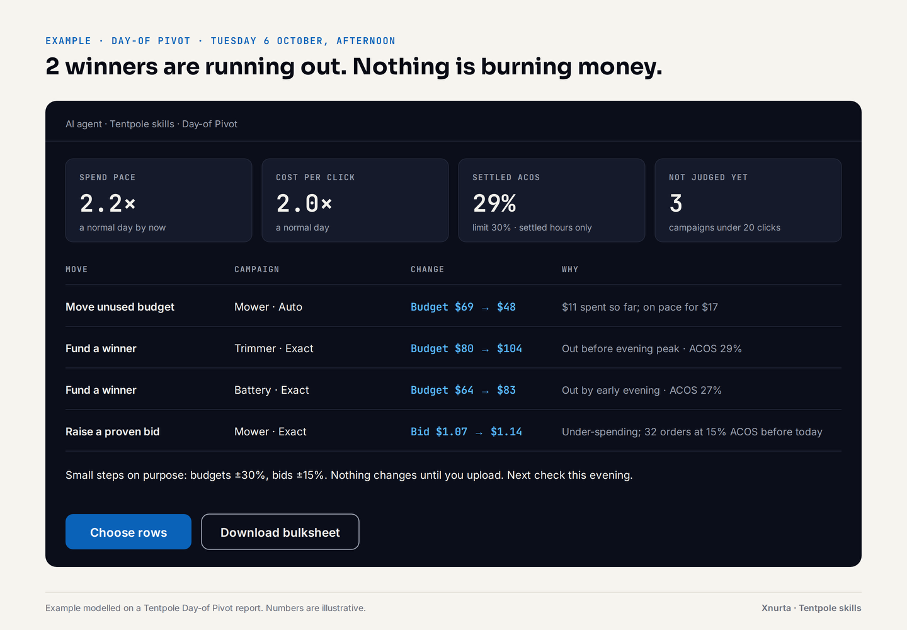
Try this prompt: “It's the afternoon of Prime Big Deal Days. Here is my hourly Campaign report for account [X]. Show budget pace, ACOS against our [30]% goal and sales against plan, and suggest moving up to $[200] a day from campaigns that can't spend theirs to winners that will run out before the evening peak.”
Deal day changes three things at once: clicks cost more, orders arrive hours after the click, and deal prices lower order value.
A skill lets your AI assistant run your judgement instead of replacing it. On its own, an assistant gives generic advice. A skill is where you write your playbook down once, and the assistant reruns it for every client, at every check-in.
Try this prompt: “Here is our deal-day SOP [attach]. Add it to the Tentpole skills as our house rules: keep our thresholds, client strategies and approval rules exactly as written, and ask me about anything the SOP leaves open.”
The free Tentpole skills are a ready-made event playbook: four AI skills that turn your Amazon Ads console reports into a plan and an upload-ready bulksheet. Xnurta runs an AI platform for Amazon ads; these skills work without it. Skills are a format Anthropic introduced for saved instructions; the download is four instruction files plus setup steps for ChatGPT, Gemini and Claude. You add them once and reuse them for every event.
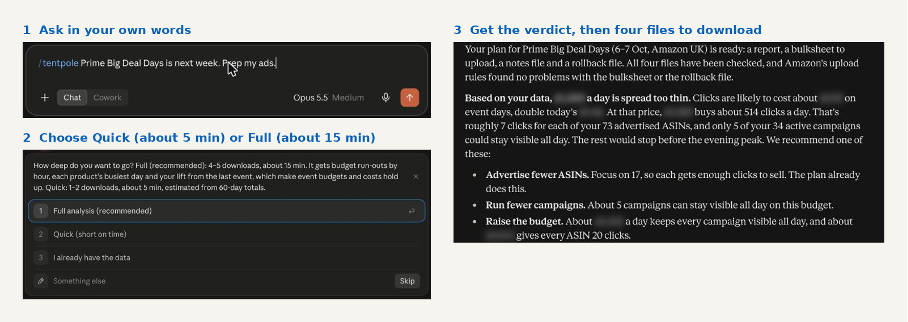
Prep plans on event cost per click (2× today's by default, or your own last event) and lists the rows that need a quick yes or no, so you approve all or pick the ones you want.
The skills run inside the AI assistant your agency already uses, so your reports go to that assistant, not to Xnurta. Use the plan your company has approved for client work, usually Claude Team or Enterprise, or ChatGPT Business or Enterprise: Anthropic and OpenAI don't train on those by default. No approved plan yet? Start with an internal brand, or a report with brand names removed. The skills never delete anything, and never plan a change above your ACOS limit or daily total.
For 15 clients: about 75 minutes of Prep the night before, plus pulling one or two console reports per client, then check-ins on your top accounts only. Split the clients across your ad managers. Each Prep run leaves its own bulksheet and rollback file; for the rest of your clients, the Prep plan carries the day. Each client's strategy goes into your copy of the skill, so every ad manager runs the event the same way.
Start today: Run the free Prep skill on one client. Nothing changes until you upload the bulksheet.
Three check-ins cover what matters. Early morning: ASINs live, bids high enough, traffic coming in. Afternoon: budget pace, ACOS against goal, sales against plan. Evening: back what's working and shift budget for the next peak. Checking more often mostly shows orders that haven't arrived yet.
No. The free Tentpole skills run in the ChatGPT, Gemini or Claude your team already uses, on the reports you download from the Amazon Ads console. They return a report and an upload-ready bulksheet, and nothing changes in your account until you upload it.
About 5 minutes per client in Quick mode, with one or two console downloads. Full mode takes about 15 minutes and adds budget run-outs by hour. Every run leaves a report, a bulksheet and a rollback file, so 15 clients is roughly 75 minutes of Prep the night before, plus the time to pull each client's reports from the console.
Your reports go to the AI assistant your agency already uses, not to Xnurta. Use your company's approved business plan, and nothing reaches Amazon until you upload the bulksheet.
An Amazon Ads MCP lets an AI assistant read your ad account with the permissions you choose, instead of you downloading reports. You don't need one for the free Tentpole skills; it's worth adding when the downloads become the slow part.
No fluff. Just what's working.